A practical build log: how to use Cursor (or any coding agent) to ship a lightweight product for cross-platform video download, AI summarization, and Stripe membership—plus reusable prompts and the pitfalls that matter in production.
Overview
Ship in this order. Avoid stacking download, summary, UI polish, and payments all at once:
- Make download work with yt-dlp, then commit to Git
- Open a fresh chat for summarization (new task, but grounded in existing docs/code)
- Improve UX (same-screen density, auto-trigger summary)
- Add payments (Stripe for global users; Alipay/WeChat for China-first audiences)
- Deploy (ECS + Docker Compose—see Section 6)
For tool products, the reliable pattern is: core capability first, expansion second. Here, the core is a trustworthy download pipeline.
1. Environment setup
Cursor works well, and so do other coding agents. With Cursor specifically, configure networking and MCP before implementation.
1.1 Cursor networking
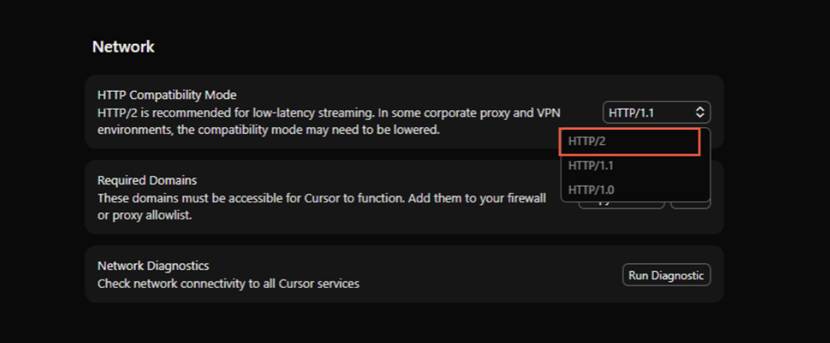
Corporate proxies and VPNs can break HTTP/2. In Cursor Network settings, switch HTTP Compatibility Mode to HTTP/1.1, then continue through the proxy.
1.2 Connect MCP first
MCP servers improve documentation lookup and web extraction:
| Service | Role | Site |
|---|---|---|
| Firecrawl | Crawl and understand web pages | https://www.firecrawl.dev/ |
| Context7 | Fetch fresher technical docs | https://context7.com/ |
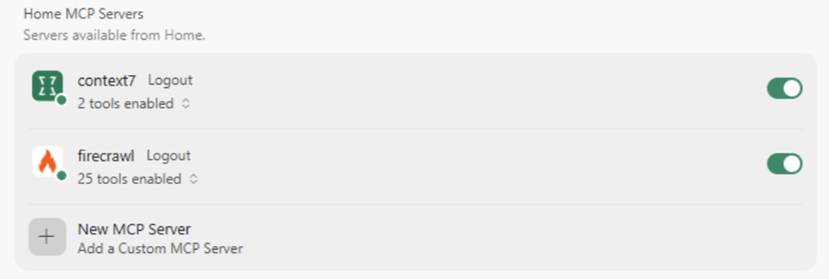
Register, get API keys, then paste them into Cursor MCP config:
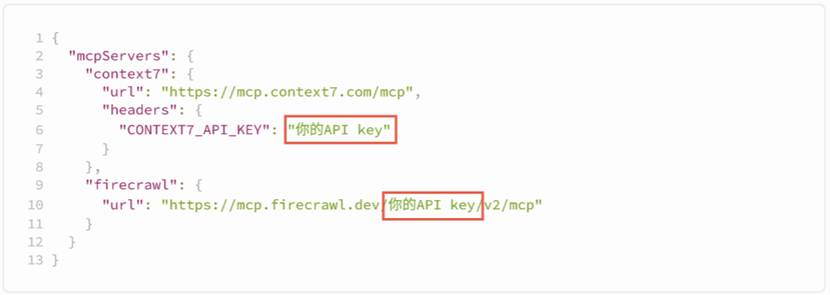
{
  "mcpServers": {
    "context7": {
      "url": "https://mcp.context7.com/mcp",
      "headers": {
        "CONTEXT7_API_KEY": "YOUR_API_KEY"
      }
    },
    "firecrawl": {
      "url": "https://mcp.firecrawl.dev/YOUR_API_KEY/v2/mcp"
    }
  }
}
1.3 Optional skills
UI skills can help with interface quality, for example ui-ux-pro-max-skill:
uipro init --ai cursor --global
# Install to ~/.cursor/skills/
2. Requirements and design
2.1 Decide before coding
| Dimension | Question | Answer in this project |
|---|---|---|
| Audience | Who is it for? | Users and creators who need to download/save videos |
| Core value | What pain does it remove? | Cross-platform download with less manual work |
| Form | How is it delivered? | Web, mobile + desktop |
| Feasibility | Can it be built? | Yes, via yt-dlp |
| Expansion | What comes later? | Summaries, translation, paid plans |
Three early decisions:
- Frontend tone: practical, conversion-oriented.
- Backend: required; v1 can stay DB-free and lightweight.
- Download strategy: reuse yt-dlp instead of owning every platform parser.
2.2 Bootstrap prompt
2.3 Delivery cadence
- Confirm architecture in Plan mode before a full Build
- Finish download first; expand only after it is stable
- Prefer separated frontend/backend with one production port
Frontend: Vue 3 in browser
        ↕  HTTP /api/*
Backend: FastAPI (Uvicorn)
  ├─ Parse / download (yt-dlp + thin platform adapters)
  ├─ AI summary / ASR / Q&A
  └─ Serve frontend/dist (single port 8000 in production)
2.4 Why FastAPI
| Framework | Performance | Dev speed | Learning cost | Fit |
|---|---|---|---|---|
| FastAPI | High | High | Low | API services, lightweight tools |
| Flask | Medium | High | Low | Simple web apps |
| Django | Medium | Medium | High | Large full-stack systems |
One backend can serve many clients. In this product, every frontend can call the same POST /api/summarize.
3. Video summarization
3.1 Keep the sequence
Before building summarization:
- Finish core download
- Commit to Git
- Start a new chat and require a full read of existing docs/code
Document at least: product overview, finished features, architecture, and key APIs.
Useful references: bibigpt.co, NoteGPT, NotebookLM—study differentiation, not copies.
3.2 Summarization prompts
Before coding:
3.3 Models and secrets
DeepSeek is enough for early verification.
Before pushing to GitHub, store keys in .env / local.env and keep them out of git.
3.4 Playback and chapter seak
Chapter timestamps should control the player:
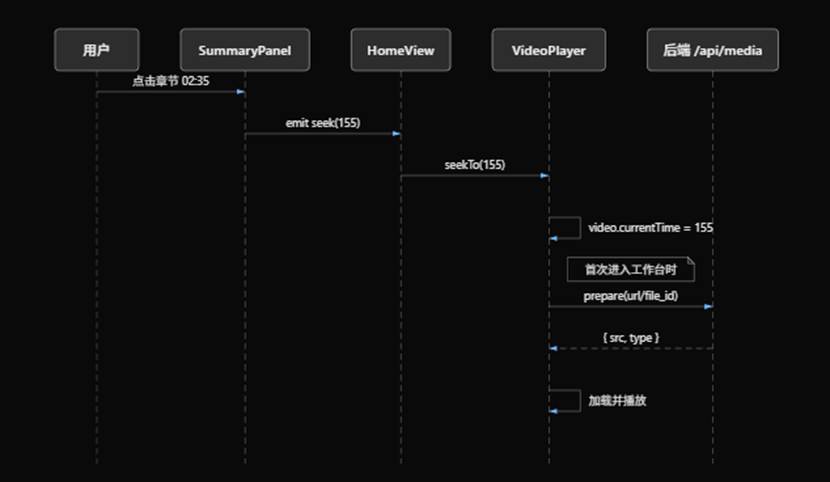
User clicks chapter 02:35
  → SummaryPanel emit seek(155)
  → HomeView calls VideoPlayer.seekTo(155)
  → video.currentTime = 155

First enter:
  VideoPlayer → prepare(url|file_id)
  ← { src, type }
  → load and play
Some platforms need dedicated playback work. Successful download does not always mean reliable playback.
4. Frontend UX
| Direction | Practice | In this project |
|---|---|---|
| Fewer clicks | Auto-trigger next step | Auto-summarize after parse |
| Higher density | Show related content together | Video info + summary side by side |
| Progressive disclosure | Core first, details later | Hide decorative hero after results |
| Responsive layout | Device-specific layout | Stack vertically on mobile |
| Feedback | Lodaing / disabled states | Block duplicate summary clicks |
Split UI changes into small steps and push often so regressions are easy to revert.
5. Payments with Stripe
| Dimension | Stripe | Alipay | WeChat Pay |
|---|---|---|---|
| Coverage | 46+ countries | Mostly China | Mostly China |
| Integration | Simple, strong docs/SDK | Medium, business credentials | Medium, business credentials |
| Testing | Mature sandbox + CLI | Limited sandbox | Limited sandbox |
| Currencies | 135+ | RMB-first | RMB-first |
| Fees | ~2.9% + $0.30 | ~0.6% | ~0.6% |
| Fit | Global / SaaS / indie tools | Domestic commerce | Domestic social commerce |
Choose Stripe for global audiences; Alipay/WeChat are often simpler for China-first products.
Webhooks notify your backend after payment events. Locally, use `stripe listen``to forward events to:
http://127.0.0.1:8000/api/billing/webhook
Listen for checkout.session.completed, customer.subscription.updated/deleted, and invoice.payment_failed.
Security checklist: secrets stay server-side; verify webhook signatures; treat server-written membership state as source of truth.
6. Deployment
Production uses Alibaba Cloud ECS + Docker Compose:
- Install Docker on Linux ECS and start the app with the repo's
compose.yaml - Inject API keys, database, and Stripe settings via
.env.docker/.env - (Optional) Put Baota or Nginx in front of the container port for domain + HTTPS
- (Optional) Wire GitHub Actions to rsync and
docker compose upongit push
For the full walkthrough (mirror tuning, firewall, health checks, production webhooks, etc.), see Aliyun ECS Deployment Guide: Docker Compose Single-Container Apps.
Appendix: prompt index
| Section | Purpose |
|---|---|
| 2.2 | Bootstrap the downloader |
| 2.4 | Backend API guardrails |
| 3.2 | Summarization expansion |
| 4 | Same-screen UX |
| 5 | Stripe membership |